Walabot Stud Finder Guide: 3D Radar Imaging
The Walabot DIY 2 represents the biggest generational leap in wall scanning technology since the electronic stud finder was invented 45 years ago. Instead of relying on blinking LED bars or audio chirps, Walabot pairs with your iPhone or Android smartphone to give you a real-time visual "X-ray" window behind drywall up to 4 inches deep. See how Walabot works, what it can detect, and how it compares in our best stud finder review.
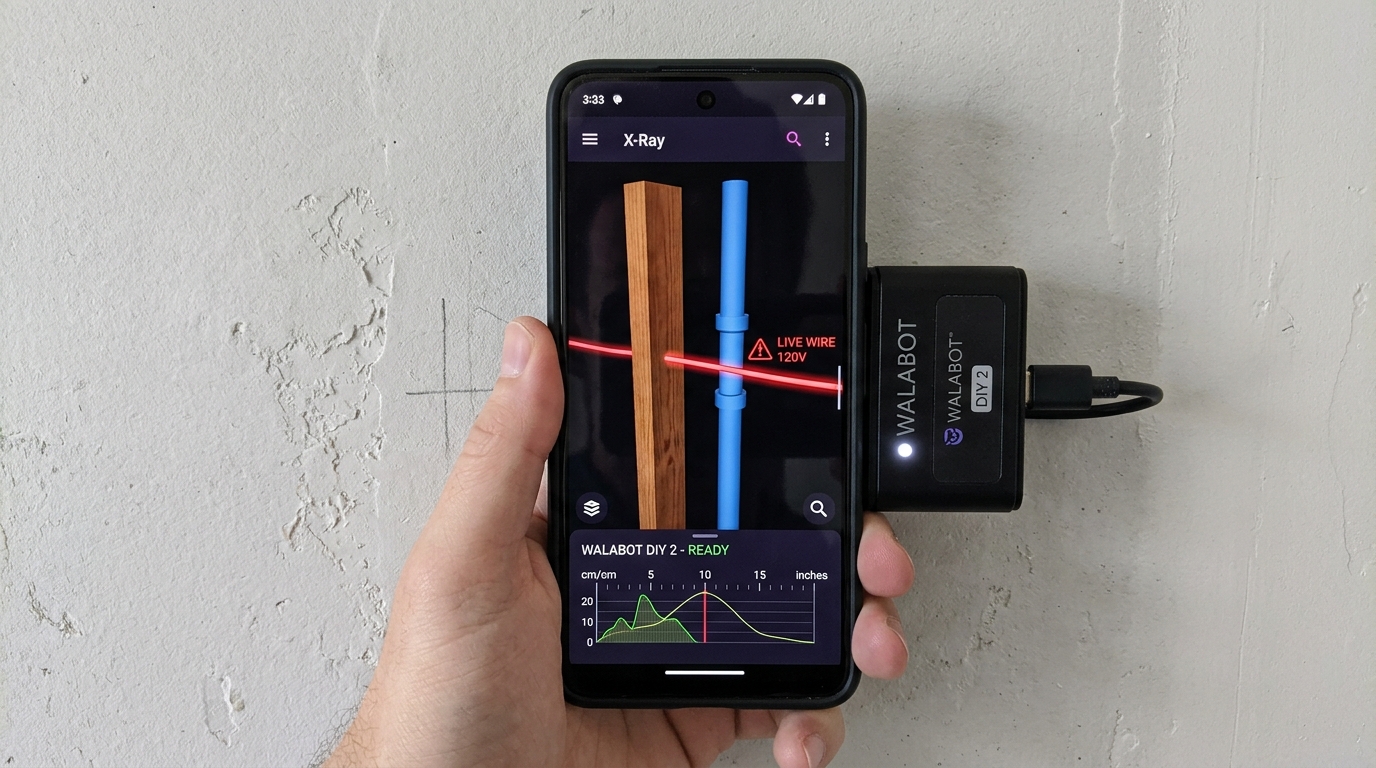
Peers 4 Inches Deep into Drywall & Plaster
Eliminates guesswork by displaying an actual 3D visual representation on your phone screen. Identifies wood studs, metal framing, PVC pipes, and energized 120V electrical wiring.
1. How 3D Radio Frequency Radar Works
Traditional stud finders from brands like Zircon or Craftsman rely on electrostatic capacitance. When wall materials change density, capacitance fluctuates, but the tool has no idea what is actually causing the change. A metal pipe, a knot in the wood, or a live wire can all trigger the same stud alert.
Walabot emits high-frequency radio waves (between 3.3 GHz and 10 GHz) that bounce off objects behind drywall. By analyzing the time-of-flight and wave phase reflections across multiple receiver antennas, Walabot calculates:
- Exact Depth: Displays distance from drywall surface in 0.1-inch increments.
- Object Geometry: Identifies whether the object is flat (stud face) or round (pipe/conduit).
- Material Properties: Differentiates wood, steel, copper, and hollow plastic PVC.
2. The 3 Walabot Operating Modes
Translates complex radar signals into clear visual icons. Shows an animated stud, pipe, or wire icon centered on your screen, complete with a depth reading (e.g., "Wood Stud — 0.8 inches deep").
Displays the raw RF radar signal as a real-time heat map. Allows contractors to view curved plumbing runs, conduit bends, and wire paths inside complex wall cavities.
Slide Walabot along a horizontal section of wall to generate a panoramic strip showing all studs, pipes, and electrical cables across the entire room.
3. How to Calibrate Walabot on Drywall
Unlike simple tools, Walabot must be calibrated through the smartphone app. For maximum accuracy:
- Connect Walabot DIY 2 to your phone via Wi-Fi and open the Walabot app.
- Select your wall type: Standard Drywall, Lath & Plaster, or Concrete/Tile.
- Place the device flat against the wall and move it in a smooth, continuous figure-8 circular pattern (about 12 inches wide) for 3 to 5 seconds until calibration reaches 100%.
- Slide horizontally across the wall without lifting the sensor from the surface.
Where Walabot Does Not Work
While Walabot is extraordinary on drywall and tile, radio waves cannot penetrate:
- Metal Wire Mesh Plaster: Diamond wire lath reflects radar waves, shielding internal studs.
- Exterior Metal Siding / Foil Insulation: Foil-faced vapor barriers reflect RF signals completely.
For wire-lath plaster walls, use a neodymium magnetic tool like the C.H. Hanson 03040 as detailed in our wall stud finder guide.
Frequently Asked Questions
Quick, authoritative answers to common wood framing, building code, and stud spacing questions.